
在向国际期刊(SCI/SSCI/EI)或顶级学术会议投稿时,两位或多位学者因共同分担核心实验与写作而享有“同等贡献(Equal Contribution)”,即共同第一作者(Co-first Authors)。
为了确保排版严谨合规、避免与单位编号及通讯作者的星号(*)产生冲突,本文提供可在 Word 与 LaTeX 中直接复制套用的标准标注模板与经典声明语句。
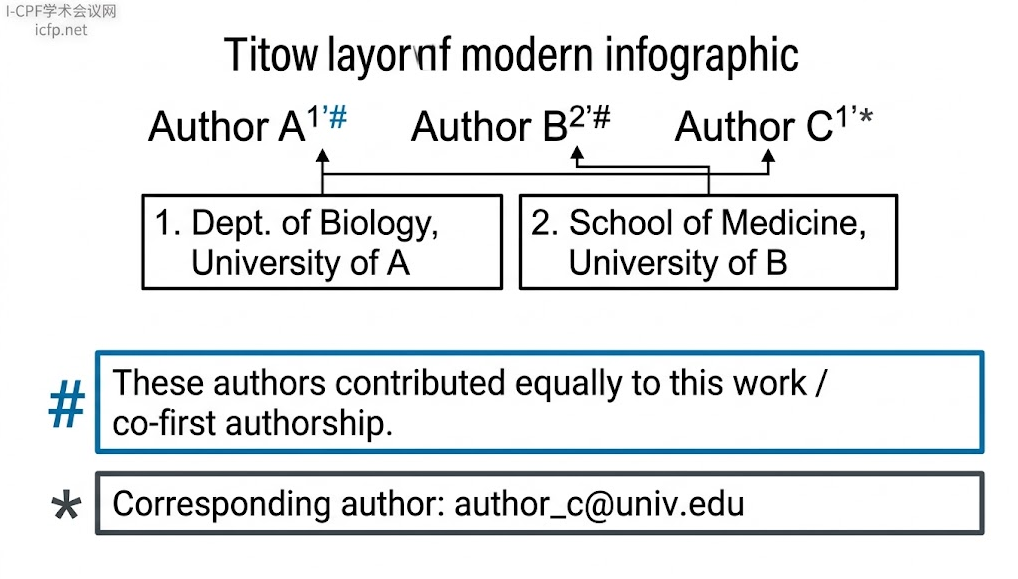
一、 核心排版黄金法则(符号分工)
在作者栏排版中,角标符号遵循严格的功能隔离原则:
-
阿拉伯数字(1, 2, 3...):专用于所属单位(Affiliation),严禁仅用相同数字代表共一作。
-
井号(#)或剑号(†):推荐用于共同第一作者。
-
星号(*):默认保留给通讯作者(Corresponding Author)。
二、 经典排版示例(作者栏 + 首页脚注)
以两名来自不同机构的共同一作、一位通讯作者为例:
1. 正文标题下方作者栏样式
San Zhang1,#, Si Li2,#, and Wu Wang1,*
2. 作者所属单位列表(Affiliations)
1 Department of Computer Science and Technology, University A, Beijing 100084, China
2 School of Electronic Engineering, University B, Shanghai 200240, China
3. 论文第一页左下角脚注(Footnote / Equal Contribution Statement)
# These authors contributed equally to this work.
* Corresponding author. E-mail: [email protected]
三、 国际期刊通用的英文声明句式模板
在第一页脚注(或文章末尾的 Author Contributions 章节)中,可根据期刊语言风格选用以下标准语句:
模板 1:标准极简型(90% SCI 期刊通用首选)
# These authors contributed equally to this work.
模板 2:强调“共同第一作者”身份
# These authors share first authorship on this manuscript.
(或: # S. Zhang and S. Li contributed equally to this work as co-first authors.)
模板 3:结合具体实验分工(高标准顶刊适用,如 Nature/Science 系列)
# S. Zhang and S. Li contributed equally to the study design, experimental execution, and data analysis.
四、 Word 实操排版步骤
在 Microsoft Word 中排版时,建议通过以下步骤规范生成脚注:
-
设置作者栏右上角标:
输入作者姓名后,输入对应的符号(例如输入
#),选中文本按下快捷键Ctrl+Shift++(Mac 快捷键为Cmd+Shift++)设置为上标。 -
插入无编号首页脚注:
-
点击 Word 顶部菜单 引用 (References) $\rightarrow$ 插入脚注 (Insert Footnote)。
-
点击脚注设置的小箭头展开面板,在“编号格式/自定义标记(Custom mark)”中输入
#,点击插入。 -
在页面底部生成的对应位置粘贴声明语句:These authors contributed equally to this work.
-
同理,再次插入自定义标记
*用于声明通讯作者邮箱。
-
五、 LaTeX 源码实现模板
不同 LaTeX 模板环境下的常用实现方式:
方式 1:通用原生 LaTeX 模板(通过自定义脚注实现)
\documentclass[journal]{IEEEtran} % 或 article, elsarticle 等

\title{Paper Title Here}

\author{
  San Zhang$^{1,\#}$,
  Si Li$^{2,\#}$,
  and Wu Wang$^{1,*}$
}

\begin{document}
\maketitle

% 在第一页左下角输出无序特殊符号脚注
\begingroup
  \renewcommand{\thefootnote}{} % 清空默认的数字编号
  \footnotetext{$^\#$These authors contributed equally to this work.}
  \footnotetext{$^*$Corresponding author: [email protected]}
\endgroup

% 正文从这里开始
\section{Introduction}
...
方式 2:Elsevier 官方新模板(cas-dc / cas-sc)语义化标签
在爱思唯尔最新的 CAS 模板中,官方提供了内置命令,无需手动拼接符号:
\author[1]{San Zhang}[equal=1]
\author[2]{Si Li}[equal=1]
\author[1]{Wu Wang}[cormark=1]

% 声明脚注说明文本
\cortext[cor1]{Corresponding author. E-mail: [email protected]}
\cortext[equal1]{These authors contributed equally to this work.}
方式 3:IEEE Transactions 官方模板常用实现
IEEEtran 模板通常更习惯在第一页的 \thanks{} 命令中统筹管理:
\author{San~Zhang$^{\#}$,~\IEEEmembership{Student Member,~IEEE,}
        Si~Li$^{\#}$,
        and~Wu~Wang$^{*}$,~\IEEEmembership{Senior Member,~IEEE}%
\thanks{$^{\#}$San Zhang and Si Li contributed equally to this work.}%
\thanks{$^{*}$Corresponding author: Wu Wang (email: [email protected]).}%
\thanks{San Zhang and Wu Wang are with the Department of Computer Science, University A, City, Country.}%
\thanks{Si Li is with the School of Engineering, University B, City, Country.}%
}
六、 投稿系统(Editorial Manager / ScholarOne)填报关键
除了正文 PDF 上的规范排版外,在投稿阶段必须完成以下核验:
-
系统元数据必须同步勾选:
在系统后台添加作者信息的界面中,通常会有复选框提示:“Co-first author / Equal contribution” 或 “Shared first authorship”。务必在系统里为每一位共同一作勾选该项。
-
检索库数据防丢失:
PubMed、Web of Science 和 Scopus 等主流引文数据库主要提取投稿系统后台填报的结构化数据,若仅在论文 PDF 正文中打上
#符号而系统内遗漏勾选,论文收录入库时可能会被判定为普通参与作者,导致共一身份失效。
上一篇
苏州大学,成立集成电路学院
9-12月想投学术会议?这份2026第四季度EI/Scopus会议清单请收好
- 50
- 发布时间:2026.09.17
2026年最后4个月,还有哪些EI/Scopus学术会议可以投?
- 50
- 发布时间:2026.09.17

2026世界顶尖科学家奖上海揭晓,邵峰院士获奖,奖金1000万
- 107
- 发布时间:2026.09.11
苏州大学,成立集成电路学院
- 155
- 发布时间:2026.09.07

第14届信息与通信网络国际会议(ICICN 2026)在西安开幕
- 178
- 发布时间:2026.09.07

2027年第八届信息技术与教育技术国际会议 (ITET 2027)

2027年第七届电子工程与信号处理国际会议(EESP 2027)