
一、这不是"万一",而是"迟早"
先给一个真实数据:
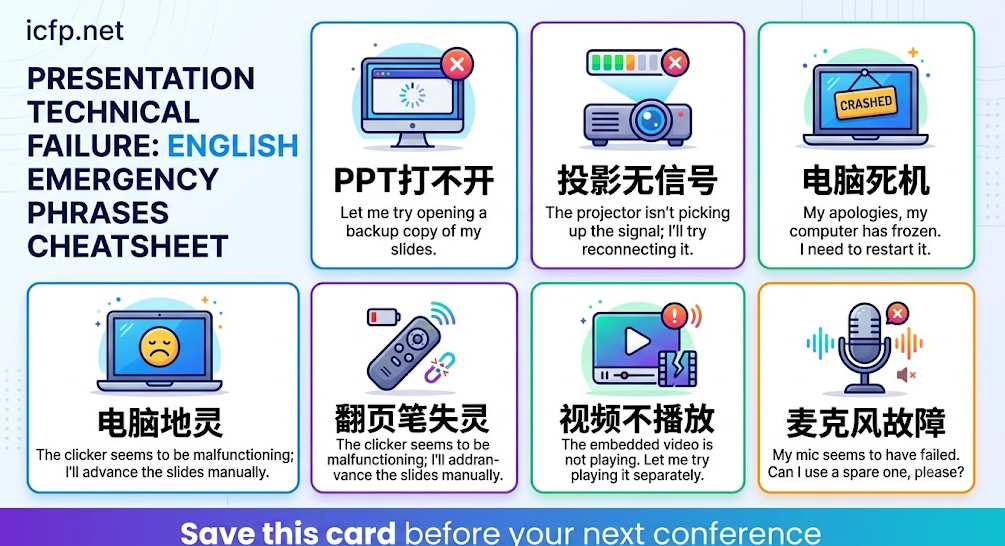
在国际学术会议上,约15-20%的Oral Presentation会遇到不同程度的技术故障。 PPT打不开、投影仪无信号、翻页笔失灵、视频无法播放——这些不是极端情况,而是高频事件。
令人恐惧的不是故障本身,而是:
- 全场几十到几百人看着你
- 你需要用英语(非母语)处理突发状况
- 沉默每多一秒,尴尬就指数级增长
- Session Chair在旁边等着你
好消息是: 只要你有准备好的话术,设备故障反而可以成为展示你临场应变能力和幽默感的机会。观众对技术故障非常理解——他们评判的不是故障本身,而是你的应对方式。
二、万能应急话术:任何故障都能用的"第一反应"句
无论遇到什么技术问题,以下句子可以让你在最初的5-10秒内保持体面:
2.1 第一时间稳住场面(前5秒)
| 话术 | 语气 | 适用场景 |
|---|---|---|
| "Well, it seems technology has its own agenda today." | 幽默轻松 | 任何故障 |
| "Ah, it looks like we have a little technical difficulty. Bear with me for a moment." | 冷静专业 | 任何故障 |
| "This is a great reminder that live demos are always an adventure." | 自嘲幽默 | 任何故障 |
| "Let me just sort this out — it'll only take a moment." | 简洁自信 | 小故障 |
| "Well, this wasn't in my rehearsal!" | 幽默 | 意外故障 |
2.2 争取时间(5-30秒)
| 话术 | 用途 |
|---|---|
| "While we wait for the slides to cooperate, let me give you some context about our work." | 边修边讲 |
| "Let me try one more thing here... In the meantime, I can start with a brief overview." | 尝试修复同时开始演讲 |
| "I'll give this a few more seconds. If not, I have a backup plan." | 暗示你有准备 |
| "Technology keeps us humble, doesn't it?" | 与观众共鸣 |
2.3 请求帮助
| 话术 | 对象 |
|---|---|
| "Could we get some technical support here, please?" | 向会务人员求助 |
| "Would the session chair mind helping me check the connection?" | 向Chair求助 |
| "Does anyone in the audience happen to have a Mac adapter?" | 向观众求助 |
| "I think we might need to switch laptops — is the conference machine available?" | 提出具体方案 |
三、具体故障场景与对应话术
场景1:PPT文件打不开 / 文件损坏
状况描述: 双击文件无反应,或打开后显示乱码/损坏。
应对话术:
[第一反应]
"It seems my file is having a moment of stage fright — just
like its author five minutes ago."
(我的文件似乎也怯场了——就像它的主人五分钟前一样。)

[争取时间]
"Let me try opening it with a different program. While I do that,
I'll start by telling you what motivated this research."
(让我试用其他程序打开。同时我先讲讲这项研究的动机。)

[备用方案]
"I actually have a PDF backup — let me switch to that.
You'll miss my beautiful animations, but the content is all there."
(我有PDF备份——让我切换过去。动画效果看不到了,但内容都在。)
实际操作:
- 尝试用PDF备份打开(永远带PDF版本!)
- 如有U盘备份,尝试另一台电脑
- 如果都失败,切换到"无PPT演讲模式"
场景2:投影仪无信号 / 黑屏
状况描述: 电脑正常但投影仪不显示,或显示"No Signal"。
应对话术:
[第一反应]
"Well, it appears the projector has decided to take a coffee
break of its own."
(投影仪似乎也决定去喝个咖啡休息一下。)

[尝试修复]
"Let me toggle the display output... Sometimes these things
just need a gentle reminder of their purpose in life."
(让我切换一下显示输出……有时候这些设备只需要被温柔提醒一下它们存在的意义。)

[等待时]
"While the AV team works on this, let me share the key
takeaway of our paper — if you remember just one thing
from my talk, it should be this..."
(技术团队处理的同时,让我先分享论文的核心要点——如果这场报告你只记住一件事,那应该是这个……)
实际操作:
- 按
Fn + F4/F5/F7(不同品牌)切换显示模式 - 检查HDMI/VGA线是否松动
- 等待技术人员处理,同时口头开始
场景3:电脑突然死机 / 蓝屏
状况描述: 正在演讲中,电脑突然死机、蓝屏或自动重启。
应对话术:
[第一反应]
"And... my computer has chosen this moment to install updates.
Perfect timing."
(我的电脑选在此刻安装更新了。时机完美。)

"Well, Windows decided my presentation needed a dramatic pause."
(Windows觉得我的演讲需要一个戏剧性的停顿。)

[如果是Mac]
"Even Apple products aren't immune to stage fright, apparently."
(显然即使苹果产品也会怯场。)

[过渡]
"Okay, while my computer recovers from its existential crisis,
let me continue from where I was. I was just explaining that
our method achieves..."
(好的,在我的电脑从存在危机中恢复的同时,让我从刚才的地方继续。我正在解释我们的方法实现了……)
实际操作:
- 等待重启(如果只需1-2分钟)
- 切换到备用设备(U盘+会场电脑)
- 如果彻底无法恢复,进入无PPT模式
场景4:翻页笔/激光笔失灵
状况描述: 翻页笔点击无响应或激光笔不亮。
应对话术:
[简短处理]
"My clicker seems to be on strike. Let me just use the keyboard."
(我的翻页笔似乎在罢工。让我用键盘代替。)

"The laser pointer has retired — I'll just use my words to
guide you through the figure."
(激光笔退休了——我用语言来引导大家看这个图。)
实际操作:
- 用键盘方向键/空格键翻页
- 换电池(永远多带一节电池)
- 用鼠标指向代替激光笔
场景5:视频/动画无法播放
状况描述: 嵌入PPT的视频无声音或无法播放。
应对话术:
[幽默过渡]
"The video seems camera-shy today. Let me describe what
you would have seen..."
(视频今天有些镜头恐惧症。让我描述一下你们本应看到的内容……)

[专业替代]
"I'll walk you through the demo verbally — essentially what
happens is: [描述视频内容]. You can find the full video on
our project page, which I'll share at the end."
(我口头为大家讲解这个演示——基本上发生的是:[描述]。完整视频在我们的项目主页上,我最后会分享链接。)
场景6:字体乱码 / 排版错乱
状况描述: PPT在会场电脑上打开后字体变形、公式错位、中文变乱码。
应对话术:
"It seems the formatting didn't survive the journey to this
computer. The content is all correct — just imagine prettier
fonts."
(排版似乎没能经受住到这台电脑的旅途。内容都是对的——请脑补更好看的字体。)

"My apologies for the formatting — this is why I always say
LaTeX is superior."
(抱歉排版有问题——这就是为什么我总说LaTeX更好。)
[注:此句需确认观众中有LaTeX用户才用,CS会议很适合]
场景7:麦克风故障 / 无声音
状况描述: 麦克风不工作或发出尖锐噪音。
应对话术:
[提高音量直接说]
"Can everyone hear me without the mic? [观众回应]
I'll just project my voice — consider this my audition for
theater."
(不用麦大家能听到吗?我就用嗓子吧——当是我的话剧试镜。)

[尖锐反馈噪音时]
"Well, that's one way to make sure everyone's awake!"
(这倒是确保大家都醒着的好方法!)
四、无PPT口头演讲技巧(终极备用方案)
当所有技术手段都失败时,你需要在没有任何视觉辅助的情况下完成演讲。这并非不可能——实际上,一些最令人难忘的学术报告恰恰是即兴口头演讲。
4.1 宣布进入无PPT模式
"Alright, it looks like the technology isn't going to cooperate
today. But the good news is — the ideas don't need electricity.
Let me walk you through our work verbally."
(好了,看起来技术今天不打算配合了。但好消息是——思想不需要电力。让我口头带大家了解我们的工作。)
"You know what, some of the best talks I've attended had no
slides at all. So let's try this old-school. Here's what we did..."
(要知道,我听过的一些最好的报告完全没有幻灯片。那我们来试试老派方式。这是我们做的……)
4.2 无PPT演讲的结构
"Let me structure this into three parts:
First, the problem we're solving.
Second, our key idea.
Third, what we found.

So, the problem is..."
(让我分三部分来讲:第一,我们解决的问题;第二,我们的核心思路;第三,我们的发现。那么,问题是……)
4.3 替代视觉的口头技巧
| 技巧 | 示例 |
|---|---|
| 数字锚定 | "Our method improves accuracy by 12 points — from 73% to 85%." |
| 类比描述 | "Think of it like a GPS that recalculates when you take a wrong turn." |
| 对比结构 | "Previous methods do X. We do Y. The difference is Z." |
| 手势辅助 | 用手画示意图/指示方向 |
| 白板(如有) | 在白板上画关键公式或架构图 |
| 重复关键点 | "The key insight — and I want to emphasize this — is that..." |
4.4 利用白板或纸笔
如果会场有白板或活页挂纸:
"Actually, let me use the whiteboard to sketch the key idea.
Sometimes a hand-drawn figure communicates better than any
PowerPoint animation."
(让我用白板画一下核心思路。有时候手绘图比任何PPT动画都更有效。)
五、全流程话术脚本:从故障到恢复
以下是一个完整的模拟场景,展示从PPT故障到成功完成演讲的全过程:
[发现故障]
You: "Hmm, it looks like my slides aren't loading. Just a moment..."

[5秒后仍未解决]
You: "Well, it seems technology has decided to test my
improvisational skills today."
[观众轻笑]

[向技术人员示意]
You: "Could we get some tech support? In the meantime..."

[开始口头演讲]
You: "Let me give you the big picture while we sort this out.
The question we're trying to answer is: [核心问题].
Why does this matter? Because [重要性]."

[1-2分钟后PPT恢复]
You: "Ah, we're back in business! [切回PPT] Okay, so as I
was saying — and now you can actually see it — this is our
proposed architecture..."

[如果始终未恢复]
You: "Alright, looks like we're going fully analog today.
I'll continue without slides — and honestly, if you can
follow my explanation without the visuals, you'll understand
the paper even better. So, our approach has three components..."

[演讲结束]
You: "And that concludes my talk — technology challenges and
all. I'll share the slides and paper link via the session
chat / conference page. Happy to take questions."

[Q&A中如被问到图表]
You: "Great question. I wish I could show you Figure 3 right
now — it's a comparison graph showing [描述]. The short answer
is: our method outperforms the baseline by [数据]. I'd
encourage you to check the paper for the detailed results."
六、Session Chair视角:他们会如何帮你
了解Session Chair的角色有助于你更好地应对故障:
6.1 Chair通常会做的事
| Chair行为 | 你的配合 |
|---|---|
| 帮你叫技术人员 | 表示感谢,继续口头演讲 |
| 问你需不需要等一下 | 根据情况决定:等还是继续 |
| 提供会场备用电脑 | 快速用U盘拷贝文件 |
| 给你额外时间补偿 | 感谢但不要超太多 |
| 建议跳过直接Q&A | 礼貌地说"I'd prefer to at least summarize the key points" |
6.2 与Chair的沟通话术
[向Chair询问]
"Should I wait for the technical team, or would you prefer
I continue without slides?"
(我应该等技术团队,还是您希望我不用幻灯片继续?)

[如果Chair给额外时间]
"Thank you. I'll try to be concise — I know we're on a
tight schedule."
(谢谢。我会尽量简洁——我知道时间很紧。)

[修好后]
"Thanks for your patience. I'll pick up the pace to stay
within my time slot."
(感谢大家的耐心。我会加快速度控制在时间范围内。)
七、预防措施:出发前的"保险"清单
7.1 文件备份(多重保险)
| 备份方式 | 存储位置 | 优先级 |
|---|---|---|
| U盘(含PPT + PDF) | 随身携带 | ★★★★★ |
| 云端(Google Drive/Dropbox) | 在线 | ★★★★★ |
| 邮箱附件 | 发给自己 | ★★★★☆ |
| 手机本地 | 手机存储 | ★★★☆☆ |
| 第二个U盘 | 包里备用 | ★★★☆☆ |
| 打印关键页面 | 纸质手卡 | ★★★★☆ |
7.2 文件格式保险
| 操作 | 理由 |
|---|---|
| 同时保存PPT和PDF版本 | PDF不会字体错乱 |
| 视频转为GIF嵌入 | 减少播放器依赖 |
| 字体嵌入PPT文件 | 防止其他电脑字体缺失 |
| 保存为兼容模式(.ppt) | 旧版Office也能打开 |
| Keynote用户另存PPT版本 | 会场电脑多为Windows |
7.3 硬件准备
| 装备 | 用途 |
|---|---|
| 自己的转接头(HDMI/USB-C/VGA) | 会场可能只有一种接口 |
| 翻页笔备用电池 | 第一大"小故障"元凶 |
| 自己的笔记本电脑 | 备用播放设备 |
| 手机+投屏线 | 终极备用方案 |
7.4 提前到场测试
| 时间 | 操作 |
|---|---|
| 前一天Session结束后 | 到会场测试设备兼容性 |
| 当天Session开始前15分钟 | 提前到达,插上电脑确认显示正常 |
| 演讲前确认 | 文件已打开,全屏模式就绪 |
八、观众心理学:他们其实站在你这边
8.1 观众的真实想法
| 你以为观众在想 | 观众实际在想 |
|---|---|
| "这人太不专业了" | "哎,技术故障谁都遇过" |
| "准备不充分" | "还好不是我在上面" |
| "水平不行" | "看他怎么处理——挺佩服临场应变的" |
| "浪费我时间" | "正好休息一下眼睛" |
8.2 事实证明
- 观众对技术故障的容忍度远高于你想象
- 从容应对故障的人比从不出故障的人更令人印象深刻
- 幽默化解尴尬会让观众对你好感倍增
- 很多大牛分享过自己设备故障的经历——这完全不影响学术声誉
8.3 绝对不要做的事
| 禁忌行为 | 为什么 |
|---|---|
| 反复道歉 | 一次就够,多次显得软弱 |
| 沉默等待不说话 | 尴尬会指数增长 |
| 慌张摔东西/拍电脑 | 失态比故障本身更糟 |
| 归咎会务组织 | 不职业 |
| 说"I'm not good with technology" | 自我贬低 |
| 放弃演讲直接走人 | 最糟糕的选择 |
九、不同英语水平的应对策略
9.1 英语流利者
- 可以使用幽默、比喻、即兴发挥
- 利用故障"加分"——展示语言能力和临场应变
- 参考第三节中的幽默话术
9.2 英语中等水平者
- 使用预先准备好的简短句式
- 不追求幽默,追求清晰和冷静
- 重点准备5-6句固定话术并熟练背诵
推荐话术包:
"Just a moment please."
"Let me try another way."
"I'll continue without slides."
"The key point is [核心结论]."
"Please check our paper for details."
"Thank you for your patience."
9.3 英语基础水平者
- 核心策略:极简表达 + 快速行动
- 不需要长句,短语即可
- 最重要的是保持镇定,不要让语言焦虑叠加技术焦虑
最简话术包:
"Sorry, technical problem."
"One moment please."
"Let me fix this."
"OK, I'll continue now."
"Please see our paper."
"Thank you."
十、故障后的"加分操作"
把技术故障变成让观众记住你的机会:
10.1 自嘲式结尾
在演讲结束时回顾故障:
"So despite the technological adventures at the beginning,
I hope the key message came through: [一句话总结核心贡献].
Thank you — and thank you to the AV team for the rescue!"
10.2 Q&A中的优雅引用
"That's a great question. If my slides were cooperating,
I'd show you Figure 5 — but let me describe it verbally..."
10.3 会后社交中的自然话题
技术故障反而成为茶歇时的天然破冰话题:
"Hey, I'm the one whose computer staged a rebellion during
the presentation earlier! I'm [Name], by the way..."
十一、总结
设备故障不可避免,但你的应对方式决定了观众对你的印象。
核心应对框架:
5秒内:一句话稳住场面(幽默或冷静)
30秒内:判断能否快速修复,同时口头开始
2分钟内:决定继续修或切换到备用方案
全程:保持自信、从容、不反复道歉
三个"永远":
- 永远带PDF备份和U盘
- 永远提前15分钟到场测试
- 永远准备一版"无PPT也能讲"的口头大纲
最终心态:
观众来是听你的研究,不是看你的PPT。设备可以坏,但你的思想和发现不会因为投影仪故障而消失。从容应对技术意外的学者,反而更让人尊敬。
上一篇
学术会议茶歇Coffee Break破冰指南:三句话向大牛介绍自己研究的技巧

2026年科学探索奖获奖名单公布
- 19
- 发布时间:2026.08.24
第十九届前沿计算机理论与工程国际会议(ICACTE 2026)在杭州举行
- 13
- 发布时间:2026.08.24

中国首位!新晋院士候选人,获国际大奖
- 174
- 发布时间:2026.08.06
第八届电力与能源技术国际会议(ICPET 2026)在蓉开幕
- 258
- 发布时间:2026.07.30
饶毅、倪忆两位教授发文澄清:四位北大教师为王虹赴法留学撰写推荐信
- 460
- 发布时间:2026.07.29

2027年第十一届机器学习与软计算国际会议(ICMLSC 2026)

2027年第11届能源经济与能源政策国际会议 (ICEEEP 2027)